
Why Daily Habits Move the Needle More Than Battery Chemistry Alone
The manufacturer rates your battery at a specific cycle count. That number is derived from lab testing under controlled conditions: consistent temperature, controlled depth of discharge, calibrated charge rates. Real-world use is not lab conditions. The gap between how a battery ages under ideal conditions and how it ages under typical owner behavior is where these habits live.
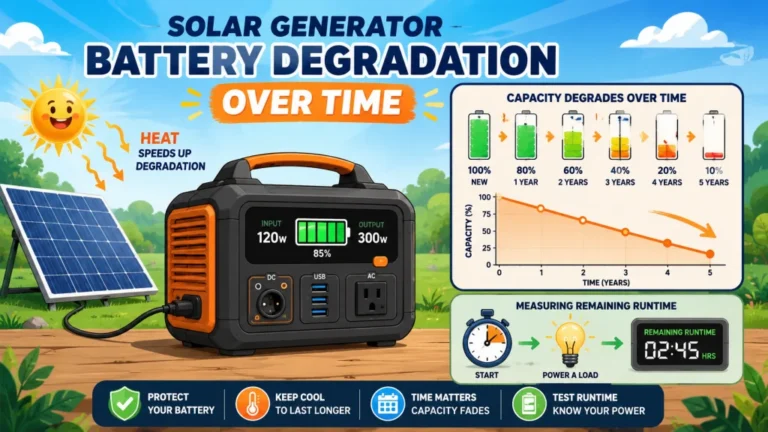
A LiFePO4 battery rated at 3,000 cycles that is regularly deep discharged to near zero, stored at full charge, and operated through seasonal heat will not reach 3,000 real-world cycles. The same battery managed thoughtfully across those same variables often exceeds the rated count. The chemistry did not change. The conditions under which the chemistry operates every day changed. That is the argument for paying attention to these habits, not as complexity to manage, but as simple decisions that compound across years of ownership.
This article is specifically about habits during active use. Long-term storage practices, including the 40 to 60 percent storage charge rule and the maintenance charge interval, are a separate topic covered in how to store a solar generator to protect battery life. The two overlap at the edges but the priorities differ enough that they are worth treating separately.
Habit 1: Do Not Drain Below 20 Percent
Every discharge below 20 percent remaining charge puts the battery into a high-stress low-voltage state that is harder on the electrode material than anything in the normal operating range. LiFePO4 handles deep discharge better than NMC lithium-ion; it will not fail from a single deep cycle the way some chemistries might, but the damage is cumulative. Each trip to near zero takes a small toll. Over hundreds of cycles, the toll is visible in capacity and runtime.
The practical rule is to recharge before the display reads below 20 percent under normal use. For emergency prep units that may run until they stop, this is harder to control, but for routine use the 20 percent floor is worth treating as a genuine limit rather than a suggestion. When the unit hits 20 percent, whatever you are running either stops or the recharge starts. Running to 5 percent saves you fifteen minutes of inconvenience on that one occasion and costs measurable long-term capacity in aggregate.
The battery management system on most units will shut the inverter off before reaching absolute zero specifically to prevent catastrophic over-discharge. That protection is for the unit’s survival, not for its health. The BMS cutoff at 0 percent is the floor of safety, not the floor of good practice. The good-practice floor is 20 percent.
Habit 2: Stop Charging at 80 to 90 Percent When You Can
The last 10 to 20 percent of every charge cycle is where voltage peaks and electrode stress is highest. A lithium battery at 100 percent charge is holding the maximum amount of lithium ions against the maximum voltage the cell can tolerate. Keeping the battery at that state for hours, which happens any time you charge to full and leave the unit plugged in or sitting, sustains that voltage stress for no functional benefit if you are not about to use the full capacity.
Units with app connectivity often have a maximum charge setpoint built into the software. Setting this to 80 or 85 percent for daily use means the unit charges faster, the final high-voltage phase is skipped entirely, and the battery ages more slowly. For a unit that is topped off regularly between uses but rarely actually needs full capacity, this setting costs almost nothing in practical usability and extends the operational life of the cells.
The one exception to this rule: charge to full the day before you expect to need the full capacity. If a storm is in the forecast and you are relying on the unit for extended backup, override the limit to 100 percent the night before. Then return the setpoint to 80 to 85 percent afterward. The one full charge cycle does not meaningfully offset the benefit of running at the conservative setpoint the other 90 percent of the time.
For units without app-controlled charge limits, the equivalent habit is unplugging the unit after it reaches 80 to 90 percent during routine charging. Not essential, since the built-in protection prevents overcharge damage, but slightly better for the cells than leaving it parked at 100 percent for hours before each use.
Field Note: My own unit has been set to an 80 percent maximum charge for three years running. I recharge before it hits 20 percent under normal daily use, and I override to 100 percent only a handful of times per year when I expect higher demand than the 80 percent ceiling can cover. Three years in, the unit still delivers within 5 percent of original runtime on my regular test load, the same 150W resistive load I have used since the first week of ownership. I cannot say with certainty how much the charge habit is responsible for that versus the unit simply having good cells to begin with, but I have run the same practice through enough seasonal conditions in Nevada to have confidence it is not hurting anything.

This 1kWh LFP battery station charges from 0 to 80% in just 50 minutes via AC input, and its LiFePO4 chemistry delivers a 3,000 plus cycle lifespan that is roughly 6 times longer than standard lithium batteries. Capacity is expandable up to 3kWh with additional batteries, making it well suited for camping, RVs, or off-grid living. Its 1,800W output powers across 15 outlets, handling around 90% of household appliances, and accepts up to 500W of solar input for clean, fuel-free charging. The package includes a 5-year customer service guarantee.
Check On AmazonIf you click this link and buy, we earn a commission at no additional cost to you.
Habit 3: Prefer Partial Cycles Over Deep Cycles
A full cycle, from 100 percent down to 20 percent and back to 100 percent, counts as one cycle against your rated total. Using only 30 percent of capacity and recharging before the next use counts as roughly one-third of a cycle. Over time, partial cycling accumulates far fewer equivalent full cycles than deep cycling does, which means the rated cycle count stretches further in real time.
This habit does not require any deliberate management for most casual users, since they naturally use the unit partially and recharge between sessions. The owners who inadvertently work against themselves are the ones who intentionally run the battery close to empty before recharging because they have heard that “full cycles are better for batteries.” That advice applies to older nickel-based battery chemistries and has been outdated for lithium chemistry for over a decade. For LFP batteries, partial cycling is strictly better than full cycling for longevity. Charge when it is convenient, not at a specific low percentage.
| Use Pattern | Equivalent Full Cycles per Year | Years to 3,000 Cycles |
|---|---|---|
| Daily use: 80% depth (20% to 100%) | ~292 cycles/year | ~10.3 years |
| Daily use: 60% depth (20% to 80%) | ~219 cycles/year | ~13.7 years |
| Daily use: 50% depth (25% to 75%) | ~183 cycles/year | ~16.4 years |
| Weekly use: 80% depth | ~42 cycles/year | ~71 years |
The table makes clear that the depth-of-discharge variable is more influential for heavy users than for light users. For a weekly camper, depth of discharge is essentially irrelevant because the cycle math returns numbers that are practically infinite regardless. For a daily off-grid user, moving from 80 percent to 60 percent average depth of discharge adds roughly 3 years of service life to the same unit. That is a meaningful difference achievable through nothing more than recharging slightly sooner.

This compact plug-in monitor tracks the energy consumption of any AC 115-volt appliance and displays real-time readings of volts, amps, and wattage at 0.2 to 2.0 percent accuracy. Its large LCD screen lets you calculate electricity costs by the day, week, month, or year, making it easy to spot energy-hungry devices and trim your utility bill. It is also compatible with inverters, adding flexibility for off-grid setups.
Check On AmazonIf you click this link and buy, we earn a commission at no additional cost to you.
Habit 4: Respect the Temperature Boundaries
Two temperature thresholds matter for active use, and both are absolute rather than gradual. Do not charge the battery when its internal temperature is below 32 degrees Fahrenheit. Do not operate or leave the unit in environments above 104 degrees Fahrenheit for extended periods.
Charging below freezing causes lithium plating, where lithium metal deposits on the anode surface instead of intercalating into the electrode material the way it does at normal temperatures. Each plating event reduces effective capacity permanently, and the damage accumulates whether or not any individual charging session felt unusual. Most current units include low-temperature charge protection that prevents the charger from engaging below a set threshold, but the protection logic varies. If you bring a cold unit in from a winter vehicle and plug it in immediately, check the display for any temperature warning before assuming the charge is proceeding normally.
The upper temperature limit is about chemical aging rate rather than immediate failure. Above 104 degrees Fahrenheit, the rate of electrolyte breakdown and electrode degradation accelerates significantly, reducing cycle life independent of how carefully you manage charge depth. Prolonged operation in direct sun in summer, or leaving the unit in a closed vehicle during hot weather, are the most common ways this threshold gets crossed. If the fan is running loudly and continuously during charging, that is the thermal management system working to stay below the safe operating range. Move the unit to a cooler location rather than treating the fan noise as background noise to manage around.
Habit 5: Keep Firmware Updated on App-Connected Units
Smart solar generators use a battery management system that is partially governed by software. The BMS logic determines how aggressively the unit charges in the final voltage range, how it handles low-temperature detection, when it triggers protective cutoffs, and how accurately it reports state of charge. Firmware updates from the manufacturer often include refinements to this logic, including improvements in cell balancing, better temperature compensation, or corrected charge curve calibration that did not make it into the factory firmware at launch.
This is not a frequent task. Checking the companion app for firmware updates once every few months is sufficient for most owners. When an update is available, apply it with the unit at a reasonable charge level and connected to wall power so the update process does not drain the battery mid-installation. The practical benefit over time is a BMS that is increasingly calibrated to the real-world aging behavior of the cell chemistry, which tends to result in better capacity estimates, more accurate runtime projections, and protection logic that fits the battery’s actual state rather than factory assumptions.
For units without app connectivity, this habit does not apply. Factory firmware in those units does not receive field updates, and the BMS logic is fixed at production settings for the life of the unit.

Weighing just 23.8 lbs with a foldable handle, this 1,070Wh LFP power station delivers 1,500W of pure sine wave AC output with a 3,000W surge capacity, capable of running AC units, fridges, and electric pots. Its LFP battery sustains over 70% capacity after 4,000 cycles, translating to a lifespan of more than 10 years. Via the Jackery App, you can enable a full charge in as little as one hour, or switch to a whisper-quiet 30 dB overnight mode. Six output ports including two USB-C with 100W PD charging cover nearly any device simultaneously.
Check On AmazonIf you click this link and buy, we earn a commission at no additional cost to you.
Habit 6: Do Not Block the Vents During Charging or Heavy Use
The cooling fan in a solar generator is thermal management, not a nuisance. When the inverter or charging circuit generates heat under load, the fan moves air across the internal components to keep cell temperature within the operating range. A unit squeezed into a tight space between furniture, draped with anything, or operated inside a closed bag is forcing the cells to absorb heat the fan was designed to dissipate.
This sounds obvious but it comes up more than it should, particularly for home backup installations where people push the unit against a wall or into a cabinet to minimize floor footprint. Maintaining at least a few inches of clearance on the vent side is not an aesthetic preference, it is a thermal management requirement. The fan telling you it is working is not a problem to solve by restricting airflow. It is the unit successfully managing a thermal load. Let it do that.
Key point: These six habits work together: keep the operating range between 20 and 80 to 90 percent, prefer partial cycles over deep ones, charge only above freezing and away from extreme heat, update the firmware when available, and leave the vents clear. None of them require new equipment or daily monitoring. Most reduce to one-time setup choices, such as the charge limit setpoint, and a few ambient awareness habits about temperature and clearance.
The Real-World Tradeoffs Worth Knowing
Running the battery between 20 and 80 percent instead of 0 to 100 percent reduces your usable capacity per session. On a 2,000Wh unit, the conservative operating range gives you roughly 1,200Wh of practical capacity per cycle instead of the full 2,000Wh. For a unit sized tightly for a specific overnight load, that difference may be significant enough that the habit is not worthwhile. For a unit sized with headroom above the expected load, the same habit costs almost nothing in daily usability while extending cycle life measurably.
The firmware update habit introduces a small risk of a failed update creating a BMS calibration issue. This is uncommon but not unheard of on first-generation firmware releases. If a firmware update produces unexpected behavior, including incorrect charge percentage display, charging that stops early, or unusual fan behavior, the manufacturer support line is the right next step, and most current units have a firmware rollback option in the app. The risk is low enough that the habit is still worth following, but knowing the rollback path exists before an update goes sideways is useful information.
The vent clearance habit competes with the installation footprint most people prefer. Very few owners keep a $1,200 battery in the center of an open room with four feet of clearance on all sides. A reasonable middle ground is positioning the unit so the actual vent grille faces open space rather than a wall, and avoiding enclosed cabinets entirely during active use and charging. Tight but open is workable. Enclosed is not.

This 15-foot NEMA 5-15 extension cord features a slim flat plug designed for tight spaces behind furniture, desks, and bookshelves, letting you push pieces flush against the wall while still accessing the bottom outlet. The 14 AWG wiring handles up to 15A and 1,875W more safely than thinner 16 AWG alternatives, with less heat buildup under load.
Check On AmazonIf you click this link and buy, we earn a commission at no additional cost to you.
Final Thoughts: The Habits That Actually Matter Across the Ownership Period
The charge limit setpoint and the 20 percent floor are the two habits with the clearest measurable impact over the ownership period. If you do nothing else from this article, those two are the ones worth implementing immediately. The temperature habits are binary rather than gradual. Either you charge below freezing and do damage, or you do not. They are mostly about awareness at the boundaries rather than constant management. Vents and firmware are lower-stakes but collectively contribute to the same end goal: a unit that performs close to original spec years into ownership rather than degrading ahead of the curve.
If you notice runtime is already shorter than it used to be, the habits in this article will not recover capacity that has already been lost. At that point the question is how much capacity remains and whether it still covers your use case, a measurement covered in how to detect solar generator battery degradation with a simple runtime test. If the reduction is significant enough to affect usability, how solar generator battery lifespan works across all three aging factors puts degradation, cycling, and calendar aging in context for deciding whether continued use or replacement makes more sense.
These habits are most effective started on a new unit or one in early use when the full cycle life is still available to protect. The complete solar generator guide covers how to evaluate battery chemistry and rated cycle count at purchase, which is the upstream decision that determines how much cycle life these habits have to work with in the first place.

Starting at 2kWh and expandable to 6kWh with two additional batteries, this LFP station reaches 80% in just 43 minutes via combined AC and solar input. Its 3,000-cycle battery outlasts the industry average by 6 times and includes a 5-year service guarantee. With 2,400W output across 15 outlets and X-Boost pushing to 3,400W, it handles 99% of household appliances at a whisper-quiet 30 dB.
Check On AmazonIf you click this link and buy, we earn a commission at no additional cost to you.
FAQs
🔋 Should I drain my solar generator fully before recharging?
No. The “drain to zero before recharging” rule applies to older nickel-based battery chemistries and is actively harmful for lithium iron phosphate. Recharge before the display falls below 20 percent. Partial cycling is strictly better than deep cycling for LFP longevity.
⚡ Is it bad to leave my solar generator plugged in at 100% all the time?
Yes, over time. Keeping a lithium battery at maximum charge voltage for extended periods sustains the electrode stress of the fully charged state continuously. If the unit has an app-controlled charge limit, setting it to 80 to 85 percent for routine use removes this stressor entirely. If not, unplugging after it reaches full charge is better than leaving it parked at 100 percent for days between uses.
❄️ Can I charge my solar generator in cold weather?
Not below 32 degrees Fahrenheit. Charging LFP below freezing causes lithium plating on the anode, which permanently reduces capacity. Let the unit warm to room temperature first. Most current units include low-temperature charge protection, but the threshold and reliability of that protection varies by model. Do not count on it as the only line of defense.
🌡️ Does running a solar generator in hot weather damage the battery?
Sustained operation above 104 degrees Fahrenheit accelerates chemical aging significantly. Direct sun exposure in summer, operating inside a closed vehicle, and inadequate ventilation during charging are the most common causes. If the fan is running loudly and continuously, the unit is managing a thermal load. Move it to a cooler location rather than restricting airflow to reduce the noise.
📲 Should I update my solar generator’s firmware?
Yes, for app-connected units. Firmware updates often include BMS logic improvements that affect charge curve accuracy, low-temperature detection, and cell balancing. Check every few months and apply updates with the unit on wall power at a reasonable charge level. Know the rollback path in the app before updating in case the new firmware produces unexpected behavior.
🌬️ Does it matter where I place my solar generator while charging?
Yes. The vent grille needs open airspace in front of it during charging and heavy use. A unit pushed flush against a wall, placed inside a cabinet, or covered with anything during operation cannot manage its internal temperature effectively. A few inches of clearance on the vent side is the minimum. Enclosed spaces during charging are not workable regardless of room temperature.