What Your Solar Generator Is Actually Telling You
Your solar generator is beeping. It has been beeping for 30 seconds, the grid is down, and right now is not the time to dig through a manual. The short version: most solar generator alarms fall into a few recognizable categories, each with a recognizable pattern and a corresponding fix. Knowing which one you are dealing with is most of the diagnostic work.
From what I have seen across a lot of real use situations, owners assume the worst when an alarm sounds during an outage. In practice, a beeping unit is almost always reacting to something you can resolve quickly. The alarm is the protection circuit doing exactly what it was built to do. What matters is identifying which protection triggered.
There is a meaningful difference between a beep that stops when you take action and a beep that continues regardless of what you do. Keep that distinction in mind as you read through each type below. It will tell you a lot about whether you have an owner-fixable situation or something that needs to go back to the manufacturer.
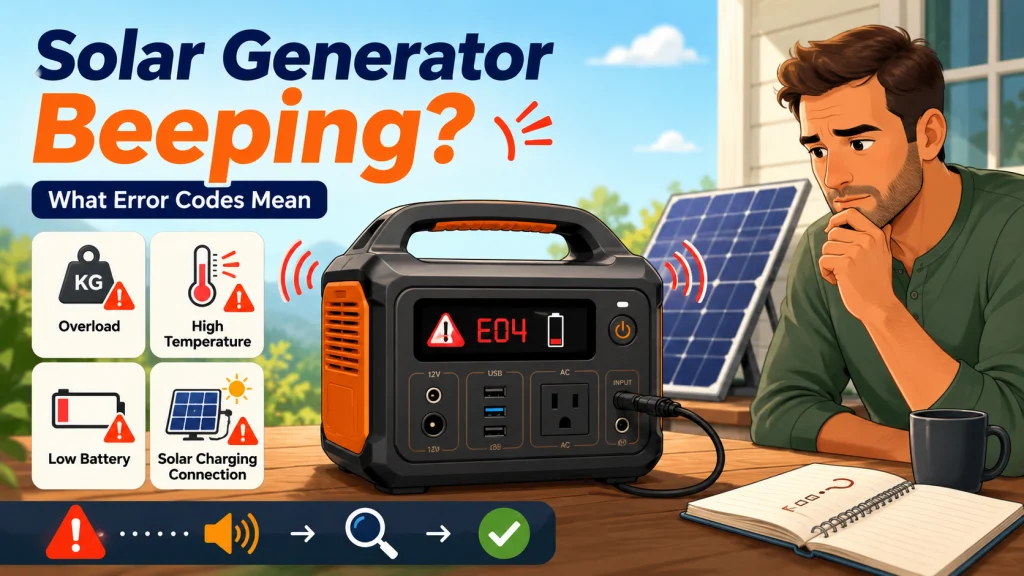
The table below maps the six patterns you are most likely to encounter. Match what you are hearing and seeing to the right row, then follow the first action. The sections below cover each one in full.
| Beep pattern | When it happens | Likely cause | First action |
|---|---|---|---|
| Single short beep | At power-on or panel connection | Normal confirmation or MPPT initialization | Nothing required |
| Continuous alarm while running appliances | During normal load operation | Overload: combined draw exceeds rated output | Unplug the highest-draw appliance immediately |
| Beeping, fan at high speed, unit warm | Under heavy load or in a hot environment | Thermal protection | Disconnect all loads, move to a cooler location |
| Single beep then shutdown, battery near empty | When display approaches zero | BMS low battery cutoff | Recharge before next use |
| Continuous or repeating beep during solar charging | While panel is connected | Loose connector or panel voltage out of spec | Reseat connectors; check panel voltage against unit’s input spec |
| Continuous beeping, no load, normal temp, no clear code | No obvious trigger | Possible internal fault | Stop using the unit and contact warranty support |
The first five rows are owner-fixable. The last one is the exception, and it is also the rarest. Each pattern has its own section below.
The Overload Alarm
A continuous alarm while appliances are running is an overload. The combined watt draw of everything plugged in has exceeded the unit’s continuous output rating. Fix it immediately: unplug the highest-draw appliance and wait. The unit should stop the alarm and recover on its own within a few seconds once the load drops below the rated limit. No reset required.
The appliance you unplugged is almost certainly pulling more than you expected. Refrigerators, window AC units, and space heaters regularly exceed their nameplate wattage during compressor startup or heating element cycles. I have watched buyers size a unit correctly on paper based on labeled wattage, then hit the overload alarm the first time the refrigerator kicks on. What they sized for was the running wattage. What the unit saw was the startup surge, which can be two to three times higher for a fraction of a second.
Field Note: The most common first-day support question I dealt with was the overload beep after someone plugged in a window AC unit. They had done the math on the nameplate wattage and thought they were fine. The compressor startup surge told a different story. If your unit trips the alarm on appliance startup but runs fine once it is on and cycling normally, your continuous watt rating is probably sufficient. Your surge watt rating is the issue. Both the unit and the appliance have surge ratings. Both need to line up.
- Unplug the highest-draw appliance immediately and wait for the alarm to stop before doing anything else.
- If the alarm stops when you unplug, measure the appliance’s actual draw under real operating conditions with a plug-in power meter rather than relying on the label.
- If the alarm trips on startup but not during normal operation, check the surge watt spec on your unit and compare it to the appliance’s starting surge. That is the number that matters for this problem.
- If reducing the load does not stop the alarm, check whether the unit is warm. You may have an overload and a thermal condition happening at the same time.
- Do not attempt to silence the alarm by holding buttons while the overload condition still exists. The protection is there for a reason.

This compact plug-in monitor tracks the energy consumption of any AC 115-volt appliance and displays real-time readings of volts, amps, and wattage at 0.2 to 2.0 percent accuracy. Its large LCD screen lets you calculate electricity costs by the day, week, month, or year, making it easy to spot energy-hungry devices and trim your utility bill. It is also compatible with inverters, adding flexibility for off-grid setups.
Check On AmazonIf you click this link and buy, we earn a commission at no additional cost to you.
The Temperature Alarm
Beeping while the cooling fan is running at high speed, combined with the unit feeling warm to the touch, indicates thermal protection. The battery or inverter has hit a temperature ceiling the BMS will not let it exceed. Disconnect all loads, move the unit to a cooler spot, make sure the vents are not blocked, and give it 15 to 30 minutes. The unit will recover automatically when it drops back into safe operating range.
This alarm is common during summer outages for a straightforward reason. Running the unit under heavy load in direct sunlight combines two heat sources: ambient heat from sun exposure and inverter heat from high draw. Either one alone is manageable. Together, they push the thermal ceiling faster than most owners expect. I have watched people set the unit in full sun to maximize solar input while running a window AC off it, then wonder why it keeps shutting down every hour. The fix is simple: put the panel in full sun and the unit in shade. A few meters of extension cable is worth more than any other setup decision you can make in warm weather.
At high ambient temperatures, even a unit running at 70 to 80 percent of rated output generates enough heat to trigger thermal protection if airflow around the vents is restricted. Carpet, storage bags draped nearby, or a tight enclosed space will do it. The unit needs air moving around the vents. This is not a flaw in the design. It is the protection circuit working correctly.

Rated at 125V, 15A, and 1,875W with a 3-prong grounded NEMA 5-15P and 5-15R connector set, this 25-foot 12 AWG extension cord is built for both indoor and industrial outdoor use. The flame-resistant, waterproof, and cold-resistant PVC jacket handles temperatures down to negative 50 degrees Celsius, while the high-visibility yellow color reduces tripping hazards on job sites. Oversized plugs, strain relief at both ends, a hookable socket design, and ETL and cETL certification all contribute to safe, reliable operation. A highly flexible vinyl construction resists kinking and breaking under repeated bending and pulling, and storage straps make repacking straightforward after each use.
Check On AmazonIf you click this link and buy, we earn a commission at no additional cost to you.
The Low Battery Shutdown Beep
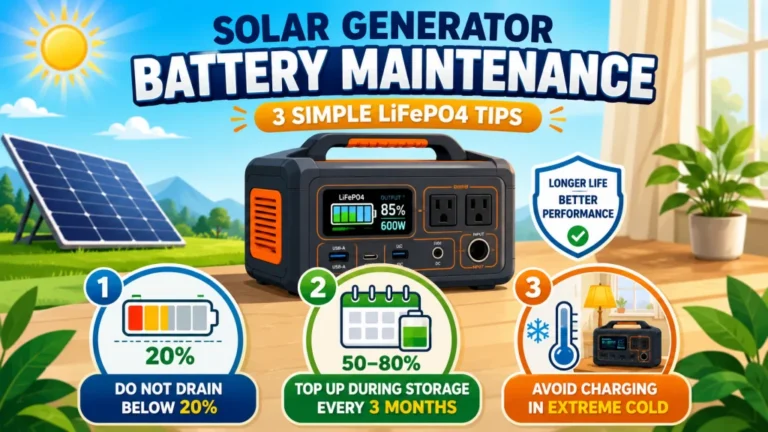
A beep followed by shutdown when the battery display is near empty is the battery management system preventing a complete discharge. This is not a failure. LiFePO4 batteries take on lasting damage from deep discharge, and the BMS cutoff exists specifically to protect against that. Recharge before using again and you will have no lasting issue from this event.
One thing worth knowing: the displayed percentage at cutoff is not always zero. Depending on how the manufacturer set the BMS protection threshold, some units cut out at 5 percent remaining, others at 10 percent, and some as high as 15 percent. If your unit shuts down earlier than the display seems to suggest it should, that is intentional. The percentage you see reflects the usable range the BMS allows, not the absolute physical capacity of the cells. The cells still have charge in them. The BMS is just not going to let you access it, because doing so repeatedly shortens battery life significantly over time.
The low battery beep is probably one of the least alarming patterns once you know what it is. It means the unit ran until it reached its floor and protected itself. That is exactly the right behavior.

Weighing just 15.4 pounds with a 22% conversion efficiency, this foldable solar panel pairs with EcoFlow power stations to maximize output in cold and cloudy conditions through MPPT algorithm optimization. The seamless one-piece construction is fully waterproof for worry-free use at camp or on the trail, and an ETFE film coating adds long-term UV protection. The included kickstand case doubles as a protective cover during transport and a flexible stand that lets you angle the panel in any direction, with support for daisy-chaining multiple panels side by side. An XT60i charging cable is included in the box for immediate use.
Check On AmazonIf you click this link and buy, we earn a commission at no additional cost to you.
Reading Solar Generator Error Codes and Display Errors
When your unit shows an error code instead of a plain-language warning, the path to decoding it depends on the brand. There is no universal fault code standard across portable power stations. Each manufacturer uses its own numbering or letter system, which means you need to go to the right reference for your specific unit. The table below covers the four main brands you are likely to be working with.
| Brand | Where to find the error meaning | What to look for |
|---|---|---|
| EcoFlow | Brand app, connected via Bluetooth | The app translates error codes into plain-language descriptions automatically. No manual lookup required if the app connects. |
| Jackery | User manual, F-code table | Units display F01 through F18 codes. The manual included in the box has the full table. It is also on the Jackery support site by model. |
| Anker Solix | Anker support site, model-specific error reference | Search your model number plus “error code” on the Anker support page. The app may also surface the description on connected models. |
| Bluetti | Model-specific manual or beep pattern guide | Bluetti’s error system requires the manual for your specific model. The generic Bluetti guide does not cover all units. Check the support site and enter your model number. |
For any app-connected unit, the quickest path is always the app. Connect via Bluetooth before attempting anything else. Most modern units will describe the fault in plain terms through the app rather than making you decode a number. If the unit is not connecting to the app, check whether it needs a firmware update first. Some connectivity problems are software-level and a firmware update resolves them. That kind of maintenance step is easy to overlook but matters more than most owners realize, which is covered in the solar generator troubleshooting guide alongside the full range of other symptom categories.
A solar generator display error that appears alongside beeping will often match one of the beep patterns already described above. Overload, thermal protection, and low battery events are commonly reported both acoustically and on the display simultaneously. If you already know from context what triggered the alarm, the error code is just the same information in a different format. If the alarm clears after you fix the obvious trigger, you usually do not need to chase the code further. If the code stays on screen after the condition is resolved, look it up by model before using the unit again.
The Beep During Solar Charging
A single short beep when you connect a solar panel is normal. That is the MPPT charge controller initializing as it reads the incoming voltage from the panel. It means the connection was detected. A single beep at connection followed by quiet operation is correct behavior on most units.
A continuous or repeating alarm during solar charging is a different situation. That pattern usually points to a connection problem rather than an overload or temperature event. The most likely cause is an unseated connector. Disconnect the panel, reseat the connector firmly at both ends, at the panel output and at the unit’s solar input port. MC4 connectors should click into place with a definitive snap. If they do not click, they are not fully seated and you are getting intermittent or partial contact, which can trigger a protection response.
If reseating the connectors does not stop the alarm, check whether the panel’s voltage is within your unit’s accepted input range. A panel producing open-circuit voltage above the unit’s maximum input rating will trigger a BMS protection response that may show up as a continuous alarm. You can check this with a multimeter across the panel’s output leads before connecting. It takes about 60 seconds and rules out the mismatch problem entirely. For a complete picture of how to get reliable charging input from your panels, the how to use a solar generator guide walks through the setup process from first connection through long-term operation.

This 1,999-count multimeter measures AC/DC voltage, DC current, resistance, and diode, with a 2-per-second sampling rate and backlit LCD for use in low-light conditions. Double-fuse overload protection and a silicone outer cover guard against electrical damage and drops. Data hold, auto shutoff, and a continuity buzzer round out a practical feature set for household, automotive, and industrial troubleshooting.
Check On AmazonIf you click this link and buy, we earn a commission at no additional cost to you.
Final Thoughts: When to Stop and Contact Warranty Support
The main patterns covered here, overload, thermal protection, low battery cutoff, solar connection alerts, and unexplained beeping, account for the large majority of solar generator alarms in real use. Each one has a clear trigger, a clear fix, and auto-recovery once the condition is resolved. If you can identify which one you are dealing with, you can resolve it without contacting support in almost every case.
The alarm that signals a real problem is the one that does not fit any of these patterns. Continuous beeping with no obvious trigger, no load on the outputs, normal temperature, and no error code that corresponds to a known fault type. That combination suggests an internal fault in the BMS or inverter board. That is not something to troubleshoot further on your own. Stop using the unit, document what you observed including any error codes displayed, and contact warranty service with that information. If the unit is still under warranty, that is precisely what the warranty exists for.
Most owners will never encounter the second scenario. A beeping solar generator is usually just telling you to unplug something or give it a few minutes to cool down. That is not a crisis. That is the unit communicating a temporary condition and asking for a specific response. Once you know which response it is asking for, the alarm is much less alarming.

This 1kWh LFP battery station charges from 0 to 80% in just 50 minutes via AC input, and its LiFePO4 chemistry delivers a 3,000 plus cycle lifespan that is roughly 6 times longer than standard lithium batteries. Capacity is expandable up to 3kWh with additional batteries, making it well suited for camping, RVs, or off-grid living. Its 1,800W output powers across 15 outlets, handling around 90% of household appliances, and accepts up to 500W of solar input for clean, fuel-free charging. The package includes a 5-year customer service guarantee.
Check On AmazonIf you click this link and buy, we earn a commission at no additional cost to you.
FAQs
🔊 Why does my solar generator beep when I plug in an appliance?
A single beep at plug-in is normal on some units and just means a new load was detected. A continuous alarm after plug-in means the appliance’s draw pushed the combined load past the unit’s continuous watt output rating. Unplug the appliance, check its actual watt draw under real operating conditions, and verify it falls within your unit’s rated output before reconnecting.
🌡️ My solar generator keeps beeping and then shutting off. What is causing that?
Beeping followed by shutdown is almost always thermal protection or a low battery cutoff. Check whether the unit is warm and whether the fan is running at high speed. If yes, disconnect all loads and move the unit to a cooler, well-ventilated location. If the battery was near empty when it shut down, recharge fully before the next use.
📋 Where do I find what my solar generator’s error code means?
Start with your brand’s app. Most connected units translate error codes into plain descriptions via Bluetooth without any manual lookup. If the unit is not connecting to the app, find the fault code table in the user manual for your specific model. Your brand’s support site also maintains error code references by model number.
⚡ Is it normal for a solar generator to beep when I connect a solar panel?
Yes. A single short beep at panel connection is the MPPT charge controller initializing. It means the panel was detected and the controller is starting to read the input. A continuous beep during solar charging is not normal and typically points to a loose connector or a panel voltage that falls outside the unit’s acceptable input range.
🔧 My solar generator is beeping with nothing plugged in. What could cause that?
Beeping with no load connected is unusual and worth taking seriously. It can indicate a battery fault, an internal temperature condition, or a BMS alert from the previous use. Check the display for an error code, connect to the brand app for a plain-language description, and if neither provides a clear explanation, contact warranty support with the unit’s behavior documented.
🛡️ How do I know if the beeping means I need to use my warranty?
Warranty territory is a continuous alarm with no load, normal temperature, no error code matching a known fault, and no improvement after 30 minutes. If you can connect the beeping to an overload, thermal event, low battery, or loose connector, you have an owner-fixable situation. If none of those conditions are present and the unit still beeps, stop using it and contact support with the details of what you observed.