Why Your Solar Generator Is Running Out Faster Than It Should
The version of this complaint I hear most from owners who have had their unit for a year or two sounds something like this: it used to run through the night without any problem, and now it barely makes it halfway. Diagnosing solar generator battery draining faster than expected starts with recognizing that the battery takes the blame most often simply because it is the most visible part of the system and the hardest thing to test without a method. The actual culprit is something else the majority of the time.
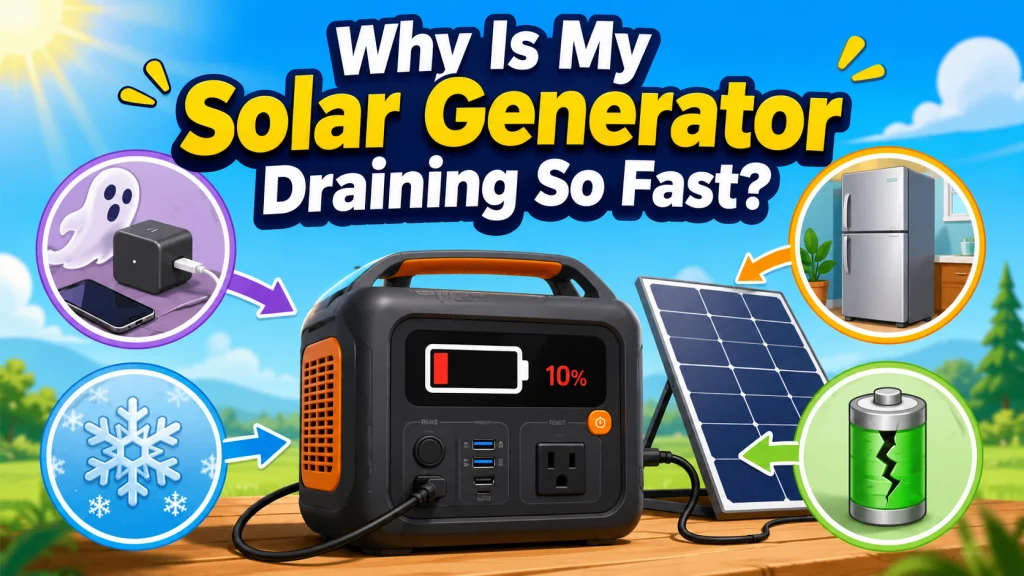
There are four causes behind almost every case of a solar generator losing capacity or not lasting as long as it once did: a phantom load from a device left connected, an appliance that is now working harder than when you first measured it, cold temperature pulling down available capacity, or actual battery degradation. That fourth cause gets assumed first and is usually last on the list of what is actually responsible. Working through them in order, starting with the most common, is how you get to a real answer without chasing the wrong problem.
One thing worth establishing before going further: this guide addresses the gradual kind of reduced runtime, the kind that has been drifting worse over weeks or months. A sudden, dramatic drop from one use to the next, with no change in load or temperature, is more likely a fault condition than a slow performance decline. That distinction matters for how you approach what comes next.
Cause 1: Something Is Drawing Power When You Think Nothing Is
Phantom loads are the first thing I check when an owner tells me their unit is draining overnight with no devices visibly running. A device that stays plugged in continues to draw power even when it appears to be off. Standby mode is not the same as zero draw, and that gap is where a surprising amount of unexplained capacity loss hides.
The numbers add up faster than most people expect. A digital clock, a small LED indicator, a smart device keeping its wireless connection alive, a router, a fan left plugged in after being switched off, any of these can pull 3 to 15 watts continuously. At 10 watts over 12 hours, that is 120 watt-hours consumed without anything visibly running. On a 500Wh unit, that is nearly 25 percent of total capacity gone overnight. On a 1,000Wh unit it is 12 percent. Neither number feels trivial when you are trying to understand why runtime keeps getting shorter.
Field Note: A customer came into the shop convinced his 1,000Wh unit had a defective battery. He would charge it to 100 percent each evening, leave it overnight with what he described as “nothing plugged in,” and wake up to 73 or 74 percent remaining. After going through everything connected to the unit, it turned out he had a small digital aquarium thermometer plugged into a USB-A port. The screen was dark. He had never thought of it as “on.” That thermometer was drawing power every hour of every night and it was the entire explanation. No defect, no degradation, just a standby draw he had stopped noticing.
The diagnostic test requires no equipment. Unplug every device from the unit, charge it to 100 percent using the wall charger, and leave it for 24 hours at room temperature with nothing connected. Check the battery level after 24 hours. A healthy unit in standby with nothing attached should lose 1 to 3 percent from its own internal draw. If it loses 10 percent or more with nothing plugged in, the unit has an internal standby issue worth reporting to support. If it holds at 97 to 99 percent, the unit itself is fine and the phantom draw was coming from something that was connected.
When the unit passes the 24-hour test, plug devices back in one at a time and monitor battery level over several hours with each one connected. The capacity drop becomes noticeably smaller or stops once the problem device is removed. That is the one to leave unplugged or replace.

This Wi-Fi smart plug connects via 2.4GHz and works with Alexa and Google Home for hands-free voice control of any plugged-in appliance, with full remote on and off control through the Kasa app from anywhere. Trusted by over 5 million users and recognized as PCMag's Reader's Choice in 2020, it carries UL certification and a 2-year warranty for added confidence. Safety features include overheating protection, a fireproof shell, and a sliding child-safety cover on the outlet face.
Check On AmazonIf you click this link and buy, we earn a commission at no additional cost to you.
Cause 2: Your Appliances Are Working Harder Than They Were
This is the cause that surprises owners the most, and for good reason: it means the solar generator is performing exactly as it should. The appliance has simply become less efficient over time, its average draw has increased, and the battery is delivering the same energy it always has to a load that now demands more of it.
A refrigerator is the clearest illustration of how this plays out in practice. When you first sized your setup and measured your fridge’s average draw, it was probably pulling somewhere around 80 to 100 watts on average. Some time later, the door seals have worn slightly, there may be dust buildup on the condenser coils, and the thermostat is cycling the compressor more frequently to hold temperature. That same refrigerator is now drawing 130 to 150 watts on average. The solar generator powering it has not changed at all. The load has. A 1,000Wh unit that once ran that fridge for 10 to 12 hours is now running it for 7 to 8 hours, and both numbers are perfectly accurate.
The same pattern shows up with CPAP machines as filters and humidifiers collect resistance, box fans as bearings wear, and any motorized appliance where efficiency degrades gradually with use. What makes this easy to miss is that the change happens so slowly there is no single moment where the difference feels obvious. It just accumulates until the runtime shortfall becomes noticeable.
Remeasuring is the fix. Get a plug-in watt meter, check each appliance currently connected to the unit, and compare the readings to whatever you recorded when you first set up the system. If the numbers have increased across even a few devices, your expected runtime needs to be recalculated from the new totals. Divide the battery’s rated watt-hours by the updated total average draw. If you have also added devices over time, things like a small lamp, an extra USB charger, or a second fan, total all of them together. Each one looks minor in isolation. Together they can shift runtime far enough that the decline looks like a battery problem when the actual cause is a load that has grown over time.

This compact plug-in monitor tracks the energy consumption of any AC 115-volt appliance and displays real-time readings of volts, amps, and wattage at 0.2 to 2.0 percent accuracy. Its large LCD screen lets you calculate electricity costs by the day, week, month, or year, making it easy to spot energy-hungry devices and trim your utility bill. It is also compatible with inverters, adding flexibility for off-grid setups.
Check On AmazonIf you click this link and buy, we earn a commission at no additional cost to you.
Cause 3: Battery Degradation, and How to Test for It Accurately
Battery degradation is real, but the rate at which it happens with LiFePO4 chemistry is considerably slower than most owners assume. The degradation rate for LiFePO4 runs around 0.5 to 1 percent of capacity per 100 charge cycles under normal use. That is a gradual process. At that rate, a unit needs to reach several hundred cycles before the runtime difference becomes noticeable, and it takes over 2,000 cycles before the reduction becomes genuinely significant.
| Cycle Count | Approximate Remaining Capacity | Real-World Effect on Runtime |
|---|---|---|
| 0 to 500 cycles | 95 to 100% | Minimal, within normal day-to-day variation |
| 500 to 1,000 cycles | 90 to 95% | Slight reduction, most owners do not notice |
| 1,000 to 2,000 cycles | 80 to 90% | Noticeable but the unit remains highly functional |
| 2,000+ cycles | 70 to 80% | Meaningful runtime reduction, worth tracking closely |
If your unit has fewer than 1,000 cycles and has been stored and charged correctly, degradation on its own is unlikely to be the primary explanation for a noticeable runtime shortfall. It may be a small contributing factor when combined with increased load, but the first two causes on this list are far more likely at lower cycle counts.
The runtime test is the most reliable method for measuring actual current capacity, and any owner can run it. Connect a single device with a stable, known constant draw. Something that pulls consistent wattage without cycling on and off. A 100-watt draw is a practical benchmark: use a combination of small non-cycling devices measured together at about 100 watts total, such as an incandescent lamp or two, or any small resistive loads you can verify with a plug-in watt meter. Avoid anything with a compressor, motor, or heating element that cycles. Charge the unit to 100 percent with the wall charger, start the load, and record the actual runtime until the unit shuts down or reaches 0 percent. Multiply that runtime in hours by 100 watts to get the current effective watt-hour capacity. Compare that number to the rated capacity on the spec sheet.
Key point: Always run this test at room temperature, between 68 and 77 degrees Fahrenheit. Cold temperature temporarily reduces LiFePO4 capacity by 15 to 20 percent, which will make a normal battery look like a degraded one. A test run in a cold garage is not a reliable baseline.
A unit showing 820Wh effective capacity against a 1,000Wh rated spec is at 82 percent, which is within expected range for a unit past 1,500 to 2,000 cycles. The same result on a unit with under 500 cycles is not expected and points to a different problem. Temperature, as I just noted, is one variable that can skew the test if it is not controlled.
Important note on AC outlet testing: If you run the runtime test using the unit’s AC outlets, do not expect the measured watt-hours to match the full battery rating exactly. The inverter uses some energy during DC-to-AC conversion, so usable AC output is normally lower than rated battery capacity. A 1,000Wh unit delivering roughly 850 to 900Wh through AC outlets may still be perfectly healthy. When comparing your result against the rated spec for warranty purposes, account for this conversion loss. A result 30 percent or more below rated capacity after factoring in inverter losses is the threshold worth escalating, not a result that simply falls short of the raw battery number.
Cause 4: Cold Temperature Reduces Available Capacity
LiFePO4 chemistry is more temperature-sensitive than most owners realize, particularly in the cold. At room temperature, the battery delivers capacity close to its rated spec. At around 40 degrees Fahrenheit, roughly the temperature of an unheated garage in winter, available capacity drops to approximately 80 to 85 percent of the rated amount. Near freezing, the reduction is more significant, and some units will refuse to charge at all to protect the cells from damage.
What matters most here is that this reduction is entirely temporary. Bring the unit inside to room temperature for an hour or two, and the full capacity returns. I have seen this confuse owners who store their units in a cold garage, pull them inside during a power outage, and immediately conclude the battery has failed because runtime is dramatically shorter than expected. It has not failed. It is cold. The two situations produce nearly identical symptoms and require completely different responses.
Knowing how to store the unit and maintain it through different seasons is part of getting reliable performance over time. The guide to operating a solar generator correctly over the long term covers storage conditions and seasonal considerations in more detail, including the recommended state of charge for long-term storage.
To confirm whether temperature is the cause in your specific case, run the runtime test described under Cause 3 once at the temperature where the unit is normally stored, and then again after the unit has been inside at room temperature for at least two hours. If the second test shows meaningfully longer runtime, temperature is responsible for the performance difference. The practical fix is to store the unit somewhere that stays above 50 degrees Fahrenheit during periods when you need full capacity available quickly. With all four causes accounted for, the only remaining question is what to do when the runtime test result itself comes back lower than expected even under good conditions.

This indoor temperature and humidity monitor reads at plus or minus 1 degree Fahrenheit and plus or minus 2 to 3 percent RH accuracy, refreshing data every 10 seconds for up-to-date readings in greenhouses, humidors, reptile enclosures, refrigerators, and home rooms. A Dry, Comfort, or Wet wellness icon gives an instant at-a-glance air quality status, while high and low record tracking lets you compare fluctuations over time. The compact design includes both a tabletop stand and a magnetic back for flexible placement, a switchable Fahrenheit and Celsius display, and comes with 1 AAA battery included. Note: product may ship under either the ThermoPro or TempPro brand name.
Check On AmazonIf you click this link and buy, we earn a commission at no additional cost to you.
When the Diagnostic Points to an Actual Problem
If you have run the runtime test at room temperature with a stable, constant load, and the result is 30 percent or more below the unit’s expected usable capacity after accounting for normal inverter loss, that is not a normal degradation result. It points to either an internal cell failure or a BMS issue, and neither of those is something an owner can address directly. That is warranty territory, and collecting the right data before making the call makes the process significantly faster.
Support teams ask for specific documentation. Showing up with “it seems to run out faster” opens a long back-and-forth. Showing up with a documented test result, the load wattage, the runtime duration, and the calculated effective capacity, moves the conversation to resolution much more efficiently. Write everything down before you call.
Before contacting support, run through this checklist to confirm the test result is valid:
- Charge to 100 percent via wall charger, then wait until the charger itself shows the charge is complete, not just when the display reads 100 percent. Some units have a lag between the display reading and actual state of charge.
- Use a constant, non-cycling load. A device that surges, cycles on and off, or varies its draw will produce an unreliable result.
- Run the test at room temperature, between 68 and 77 degrees Fahrenheit, not in a cold garage or warm vehicle.
- Record the test load in watts, total runtime in hours, and the calculated effective watt-hour capacity.
- Compare the calculated figure to the unit’s expected usable capacity after accounting for normal inverter loss, not only to the raw watt-hour rating on the spec sheet.
- If the result is 30 percent or more below expected usable capacity on a unit with fewer than 500 cycles, contact warranty service with the test data.
If your unit is also beeping or displaying error codes alongside the reduced output, those symptoms point to a different diagnostic path. What your unit’s beeping and error codes actually mean depends on the specific pattern and warrants its own attention before assuming the issue is capacity-related. Similarly, if the unit is not accepting a full charge from solar panels as part of the same symptom picture, the steps for diagnosing why a solar generator will not charge from solar panels address a different underlying cause and are separate from the runtime test entirely.
For owners dealing with multiple symptoms at the same time, working through them as part of a structured process is more efficient than troubleshooting each one in isolation. The full solar generator troubleshooting guide provides a framework for handling several issues in sequence without losing track of what has already been ruled out.

With 1,800W output, a 3,600W surge, and X-Boost pushing usable power to 2,600W, this LiFePO4 station handles refrigerators, microwaves, and heavy appliances with ease. X-Stream AC charging reaches 80% in just 45 minutes, and a 500W solar panel fills it in 2.5 hours. Its sub-10 millisecond UPS switchover protects sensitive electronics, and EV-grade CTC construction ensures a 10-plus year lifespan.
Check On AmazonIf you click this link and buy, we earn a commission at no additional cost to you.
Final Thoughts: Run the Tests Before Making Any Decisions
The runtime test at a known constant load is the single most reliable measurement you can take when a solar generator is not lasting as long as it should. Everything else on this list, phantom loads, increased appliance draw, and cold temperature effects, gets identified and ruled out before you ever need the test. In most cases, one of those three is the complete explanation and the battery is performing exactly as it should.
What I find is that most owners who work through these four causes methodically discover they are dealing with a standby device they forgot about or a load that has gradually grown, not a failing battery. The difference in response matters considerably. Unplugging a device left in standby costs nothing. Returning a unit you assumed was failing, when the real cause was a refrigerator working harder than it was two seasons ago, is an expensive mistake to make and a frustrating one to trace back. Measuring first avoids both outcomes.
If the tests genuinely point to degradation, a battery at 80 percent of its original capacity is still a functional unit for many use cases. Whether that level of performance meets your actual needs depends on what you are running and for how long. That is an evaluation worth doing with real numbers from a controlled runtime test, not from the sense that something feels different than it used to.

Weighing just 23.8 lbs with a foldable handle, this 1,070Wh LFP power station delivers 1,500W of pure sine wave AC output with a 3,000W surge capacity, capable of running AC units, fridges, and electric pots. Its LFP battery sustains over 70% capacity after 4,000 cycles, translating to a lifespan of more than 10 years. Via the Jackery App, you can enable a full charge in as little as one hour, or switch to a whisper-quiet 30 dB overnight mode. Six output ports including two USB-C with 100W PD charging cover nearly any device simultaneously.
Check On AmazonIf you click this link and buy, we earn a commission at no additional cost to you.
FAQs
🔋 How do I know if my solar generator battery is actually degrading or just losing charge from a phantom load?
Run the 24-hour test first: unplug everything, charge to 100 percent, and check the level after 24 hours with nothing connected. If the unit holds at 97 to 99 percent, the unit itself is not self-draining abnormally. Then plug devices back in one at a time to find which connected device is responsible for the phantom load. Once you have ruled out phantom loads, run the runtime test at a stable 100W load at room temperature and compare the result to the rated watt-hour capacity. That number tells you whether degradation is actually occurring and by how much.
⚡ Why is my solar generator losing charge overnight with nothing running?
A device left plugged in, even in standby mode, is the most common cause. Unplug everything from the unit, do a full charge, and check the level after 24 hours with nothing connected. A healthy unit should lose 1 to 3 percent from its own standby draw. More than that with nothing attached points to an internal standby draw issue worth reporting to support. If the unit holds its charge during this test, the overnight drain was coming from a device that had been left connected.
🌡️ Does storing a solar generator in a cold garage reduce its capacity?
Yes, and the reduction is temporary. At around 40 degrees Fahrenheit, a LiFePO4 battery delivers approximately 80 to 85 percent of its rated capacity. Bring the unit inside to room temperature for an hour or two and the full capacity returns. This is a property of the chemistry responding to cold, not a sign of permanent damage or degradation.
🔢 How many charge cycles before a solar generator starts losing noticeable capacity?
LiFePO4 degrades at approximately 0.5 to 1 percent per 100 cycles under normal use. Most owners do not notice any meaningful difference until past 1,000 cycles. At 2,000 cycles, remaining capacity is typically around 80 percent, which is still functional for most use cases. A unit under 500 cycles showing significant capacity loss is more likely dealing with a different issue than normal degradation.
🔌 My solar generator runs out faster than the spec sheet says it should. Is something wrong?
Not necessarily. Spec sheet runtime figures assume a specific load under ideal conditions, and real-world use rarely matches those assumptions exactly. Measure the actual average draw of your connected devices with a plug-in watt meter and recalculate expected runtime from your real numbers. In most cases the gap between the spec figure and actual experience is explained by a higher-than-expected load, not a battery problem.