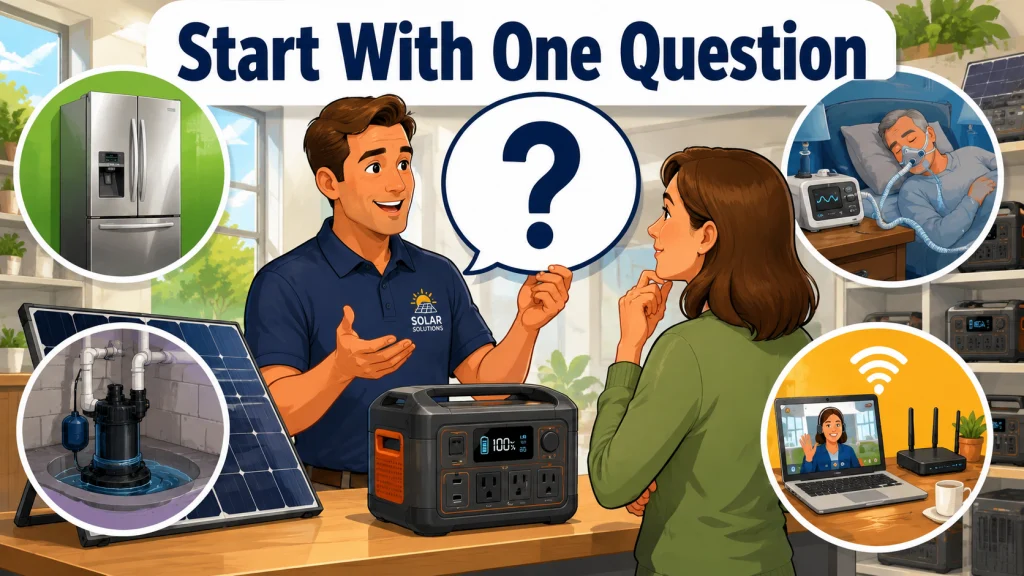
One Question, Every Time
In six years behind the counter, I had thousands of conversations about solar generators, and most of them started the same way. The buyer had already spent hours reading comparison articles that all pointed to different products, had a handful of watt-hour numbers in their head, and had no clear framework for what any of those numbers actually meant for their situation. They were not uninformed. They were overwhelmed. And the more spec-heavy the exchange got, the more stuck they became.
The question that changed how I approached those interactions was almost embarrassingly simple: “What is the single appliance or device you absolutely cannot afford to lose if the power goes out tomorrow night?” That is it. One question. The answer does not close the sale or skip the sizing math. What it does is anchor the entire decision to something real. A specific load. A specific consequence. And from there, the path forward gets considerably clearer for both of us.
What I noticed over time is that this question works because it forces a shift in how the buyer is thinking. Most people come in treating backup power like a fire extinguisher, something general, something abstract, just “coverage.” The moment they name one specific thing they cannot lose, they are no longer shopping for an idea. They are solving a real problem with real numbers attached to it. That shift makes everything easier.
Why One Answer Does More Work Than an Hour of Spec Comparison
The reason solar generator buying advice so often misses is that it treats all buyers as if they have the same problem. They do not. The person protecting a chest freezer full of meat from a three-day outage is not facing the same purchase decision as the person keeping a medical device running through the night. The watt-hour capacity that is perfectly adequate for one use case is dangerously undersized for the other. A product page cannot tell you which problem you are actually trying to solve.
When someone gives me their answer, they are also giving me their surge watt requirement, their runtime need, and their acceptable size and weight tradeoff, even if they do not realize it yet. “My refrigerator” means a compressor motor with a surge draw two to three times its running wattage, and a runtime need that extends through a multi-day outage. “My router and laptop” means low total wattage, a priority on seamless power transition, and probably a unit that fits under a desk. These are not minor differences in product category. They point to completely different sizing frameworks that lead to completely different answers.
Field Note: One of the patterns I watched repeat at the counter was buyers who came in having already landed on a popular mid-range model based on review articles. Nothing wrong with the unit. But then they would mention, almost offhand, that they had a sump pump in the basement. A few questions later it became clear the unit they had chosen could not start that pump. The startup surge alone ruled out three of the four models they were considering. That one question, asked at the start instead of twenty minutes in, would have saved a long conversation and, in a few cases, a return trip with a flooded basement and a very unhappy customer.
The other thing the question does is take pressure off the buyer. They stop trying to understand every spec and instead just describe their situation. I can work with a situation. Most buyers cannot work through a technical sheet cold, and expecting them to is how the whole thing gets lost.
The Four Answers I Hear Most Often
Most buyers, when pressed, land on one of four answers. Each one leads to a different starting point and a different set of numbers. Here is how I work through each of them.
The Refrigerator Answer
Fridge protection is the most common answer I hear, and it is also the one where buyers most consistently show up undersized. The confusion almost always comes from the same place: they look at the nameplate running wattage, somewhere in the range of 100 to 200 watts for a standard full-size model, multiply by 24 hours, and land on a number that seems manageable. The problem is that the nameplate wattage is the running draw, not the whole picture.
When a refrigerator compressor kicks on, it surges. Depending on the model and age, that startup draw is typically 350 to 600 watts, and in some cases higher. A solar generator whose surge watt rating falls below that threshold will either fail to start the compressor or trip an internal protection cutoff. I have seen both happen, and neither is a great situation during a two-day outage in July. For overnight coverage of a standard frost-free refrigerator, I would not start the sizing conversation below 2,000 watt-hours, and that assumes reasonable compressor cycling and no other heavy loads sharing the same unit. If you want to work through the math for your specific model, the detailed breakdown of what it actually takes to run a refrigerator on a solar generator is worth reading before you finalize anything.
The CPAP Answer
CPAP buyers almost always arrive expecting to spend more than they need to. There is a real anxiety behind this one: they are not protecting food or property, they are protecting their sleep and their health, often their partner’s sleep as well. Once the answer to my question is a CPAP machine, the sizing math gets much smaller, but only if the setup is done correctly. Without the humidifier active, most CPAP machines draw somewhere between 15 and 40 watts depending on the model and pressure setting. At that draw, a 300 watt-hour unit handles two full nights without difficulty. At 500 watt-hours, there may be room for a low humidifier setting, but I would not assume that until the buyer checks their machine’s actual draw. Heated humidifiers can change the math quickly depending on the setting and ambient temperature.
The detail that most buyers miss entirely is a compatible DC/DC converter. Many CPAP machines can run directly off a 12-volt DC output port using a machine-specific converter, bypassing the unit’s inverter entirely. When you skip the inverter, you also skip the efficiency loss from that AC conversion, which typically runs around 10 to 15 percent. For something running continuously through the night, that adds up in a meaningful way. This buyer does not need a $1,200 unit. They need something in the $250 to $400 range and a compatible converter for their specific machine model. The specifics on matching the right unit to a CPAP, including how the DC connection works in practice, are all in the full guide on solar generators for CPAP use. The short version: it is a much smaller problem than most buyers assume when they walk in.
The Sump Pump Answer
This is the answer where I have to deliver the most unwelcome news most consistently. Sump pumps are motor loads, and motor loads have startup surges that can run three to four times the running wattage. A pump with a running draw of 800 to 1,200 watts can pull 2,400 to 4,000 watts at startup. The majority of solar generators on the market, including most of the models that dominate buying guides and recommendation lists, cannot start a sump pump at all. Their surge watt rating simply falls short of what the motor requires.
There are units that can handle it, but they are not entry-level options, and they require careful spec verification before purchase. The surge watt rating is the first number to check, not the second. Capacity matters, but a unit with plenty of watt-hours and an inverter that cannot start the load is useless for this application. If someone tells me their primary concern is a basement that has flooded before, the entire conversation reorients around surge capacity first, everything else after.
The Work-From-Home Answer
The buyer who needs to keep working during an outage has a different problem than the others. Their concern is usually not a high-wattage appliance. It is continuity: the router, the computer, and the NAS need to keep running without a visible interruption at the moment grid power drops. One dropped Zoom call during a client presentation, or a NAS going offline mid-sync with three hours of work behind it, and the cost of the outage becomes very real very fast. That scenario points to a specific feature called UPS mode, where the unit switches to battery before any connected device has time to react. Not all solar generators include this, and among those that do, the actual transfer time varies significantly. The spec to look for is the switchover time in milliseconds. For most sensitive equipment, I want to see a transfer time under 20 to 30 milliseconds. But I always tell buyers to pull the actual number from the technical sheet rather than assume it from the label.
The wattage math for this buyer is typically straightforward. A home router draws 10 to 20 watts. A work laptop adds another 30 to 65 watts. Even with a monitor factored in, the total running load rarely exceeds 150 to 200 watts. At that draw rate, a modest unit provides many hours of runtime. The feature that matters here is not the capacity number on the front panel. It is the UPS function and the transfer time spec, which most buyers never look at until I point them toward it.
| Answer to the Question | Typical Running Draw | Surge to Plan For | Minimum Capacity Starting Point | Feature to Verify First |
|---|---|---|---|---|
| Refrigerator | 100 to 200W | 350 to 600W | 2,000Wh | Surge watt rating |
| CPAP machine | 15 to 40W | Minimal | 300Wh | 12V DC output port |
| Sump pump | 800 to 1,200W | 2,400 to 4,000W | Surge-first; runtime depends on cycling frequency | Surge watt rating (non-negotiable) |
| Router and work devices | 50 to 150W | Low | 500Wh | UPS mode, switchover speed |
The range across those four answers is not a rounding difference. It runs from a 300 watt-hour CPAP setup that fits in a backpack to a surge-first sump pump setup where the inverter rating matters more than the capacity number and runtime depends entirely on how often the pump cycles. The question is doing real work before a single spec sheet is opened.
When the Answer Is “Everything”
About a third of buyers respond to my question with some version of “everything.” They do not want to triage. They want full coverage. I understand that instinct completely, and I do not argue with it. What I do is ask a follow-up: “What is on that list, specifically?” Because what buyers mean by “everything” is almost never actually everything.
In practice the “everything” answer usually breaks down to a refrigerator, a few lights, phone chargers, and a router. That is a completely manageable load. At normal cycling rates for a standard refrigerator combined with LED lighting and device charging, most of this lands under 200 to 300 watts of average draw. A well-sized unit in the 2,000 to 3,000 watt-hour range handles this without strain, with reasonable solar recharge during the day. This is not the catastrophic math buyers often fear when they walk in.
What buyers almost never mean by “everything” is the central air conditioner, the electric range, or the well pump. Those loads belong to a different category of equipment entirely. Surfacing the real list, instead of accepting the abstract one, is where the conversation does its most useful work. The question is not designed to limit the buyer’s ambition. It is designed to make sure they know what they are actually asking for before they hand over a thousand dollars.
- Refrigerator running overnight: plan for 2,000Wh minimum, with surge headroom on the inverter
- LED lighting for four to six fixtures: 10 to 20W total, almost negligible as a sizing driver
- Phone and tablet charging for a household of four: roughly 40 to 80Wh per device per charge cycle
- Home router and work laptop: 50 to 100W combined, a 500Wh unit covers an eight-hour workday
- All of the above together: 2,000 to 2,500Wh covers most realistic “everything” lists through a 24-hour period
Once the actual list is in front of us, the sizing decision becomes straightforward. The anxiety most buyers carry in comes from the abstraction, from trying to plan for a vague emergency rather than a specific set of loads. The math, once it is grounded in real appliances with real wattages, is usually more manageable than they feared.
The Follow-Up That Turns an Answer Into a Buying Brief
Once the buyer names their one critical load, the question has done its first job. The second job is translating that answer into something actionable. That is where a short set of follow-ups comes in, and these are just as important as the first question. They take about two minutes and they are the difference between someone buying the right unit and someone buying the right-sounding unit.
The three things I ask next, in order, are these. First: how long does it need to run? There is a meaningful difference between “four hours until the power usually comes back” and “through a three-day storm.” The runtime need shapes the watt-hour number more than almost anything else, and buyers rarely think about it until someone asks. Second: does the load have a motor, compressor, or pump? If the answer is yes, there is a startup surge to account for, and the inverter’s surge watt rating becomes the first filter, not the second. Third: can you measure the actual draw or find the real spec? The nameplate wattage is a starting point, not a reliable number for cycling loads. A watt meter on the appliance for a few hours gives a far more accurate picture than any label will.
Those three follow-ups convert the buyer’s answer into four pieces of information: the critical load, the runtime requirement, the surge requirement, and the confidence level of their wattage estimate. With that in hand, a sizing decision is a straightforward process of elimination. Without it, the buyer is still guessing, just with a larger purchase attached to the guess.
Key point: Before looking at any unit, know these four things: your one critical load, how long it needs to run, whether it has a motor or compressor that surges at startup, and the real measured draw rather than the nameplate estimate. Those four answers make the spec sheet useful instead of overwhelming.
Final Thoughts: Specific Beats Popular Every Time
The most expensive solar generator is not automatically the right one. Neither is the most popular one, or the one ranked first on a site where the recommendation comes with a commission attached. The right unit is the one that reliably handles the specific thing you cannot afford to lose, with enough headroom for the conditions real use always throws at you: the cloudy second day, the compressor that kicks on at the wrong moment, and the load you forgot to count.
That is what the one question is designed to surface. It is not a shortcut around the sizing math. It is a way of making sure the math starts from the right place. A buyer who has named their critical load, checked the surge requirement, verified the relevant features, and added 20 to 30 percent headroom is in a far better position than one who is still optimizing for a number on a label without knowing what that number has to cover.
Start with the one thing you cannot lose. Size from there. Everything else is detail.
Sources and References
- U.S. Department of Energy, Energy Saver program: residential appliance energy use data, including refrigerator running draw and compressor cycling estimates
- ResMed and Philips Respironics product documentation: CPAP machine power draw specifications at varying pressure settings without humidifier, and 12V DC adapter compatibility by model
- Hydraulic Institute pump standards and residential sump pump manufacturer specifications: running wattage and startup surge ranges for standard submersible residential sump pumps
- APC by Schneider Electric UPS technical documentation: load protection requirements and acceptable switchover time thresholds for continuous-operation equipment
FAQs
🔌 What should I figure out before buying a solar generator?
Start by identifying the one appliance or device you absolutely cannot afford to lose during an outage. That single answer tells you your minimum surge watt requirement, your minimum watt-hour capacity, and which features actually matter for your situation. Everything else in the buying decision follows from there.
🧊 How many watt-hours do I need to run a refrigerator overnight?
Plan for at least 2,000Wh as a starting point for a standard frost-free refrigerator. Beyond capacity, verify that the unit’s surge watt rating comfortably exceeds the compressor’s startup draw, typically 350 to 600W, since a unit that cannot start the compressor is useless regardless of how much capacity it has.
😴 Can a small solar generator power a CPAP machine all night?
Yes. Without the heated humidifier running, most CPAP machines draw 15 to 40 watts, and a 300Wh unit handles two full nights at that draw. If you plan to run the humidifier, check your machine’s actual draw at your typical setting first, as heated humidifiers can increase consumption significantly. A compatible DC/DC converter for your specific machine model also improves runtime by bypassing the inverter.
⚡ Will a solar generator start a sump pump?
Only if its surge watt rating meets or exceeds the pump’s startup surge, which typically runs 2,400 to 4,000W for a standard residential unit. Most mid-range solar generators cannot start a sump pump. Always check the surge watt spec specifically, not just the running wattage or the continuous output rating.
💻 What feature matters most for keeping a home office running during an outage?
UPS mode, which switches the unit to battery fast enough that connected devices like routers, computers, and NAS drives do not see an interruption. Not all solar generators include this feature, and among those that do, transfer times vary. Always verify the actual millisecond transfer time in the technical spec, not just the presence of a “UPS mode” label.
📋 How much headroom should I add above my calculated watt-hour need?
Add 20 to 30 percent above your calculated load. Real conditions rarely match best-case assumptions: solar input drops on overcast days, cycling loads run harder in extreme temperatures, and there are almost always a few loads that were not in the original estimate. The headroom is not padding. It is the margin that makes the unit reliable when conditions are not ideal.
🏠 How do I know if a solar generator can handle my “everything” list?
Write out the actual list. Most “everything” lists come down to a refrigerator, LED lights, phone chargers, and a router, which combined average 200 to 300W of draw. A unit in the 2,000 to 2,500Wh range covers that load through a 24-hour period with solar recharge. The math is usually more manageable than the abstract version of “everything” suggests.