Third-Party Solar Panels Work Fine. Here Is the Compatibility Check.
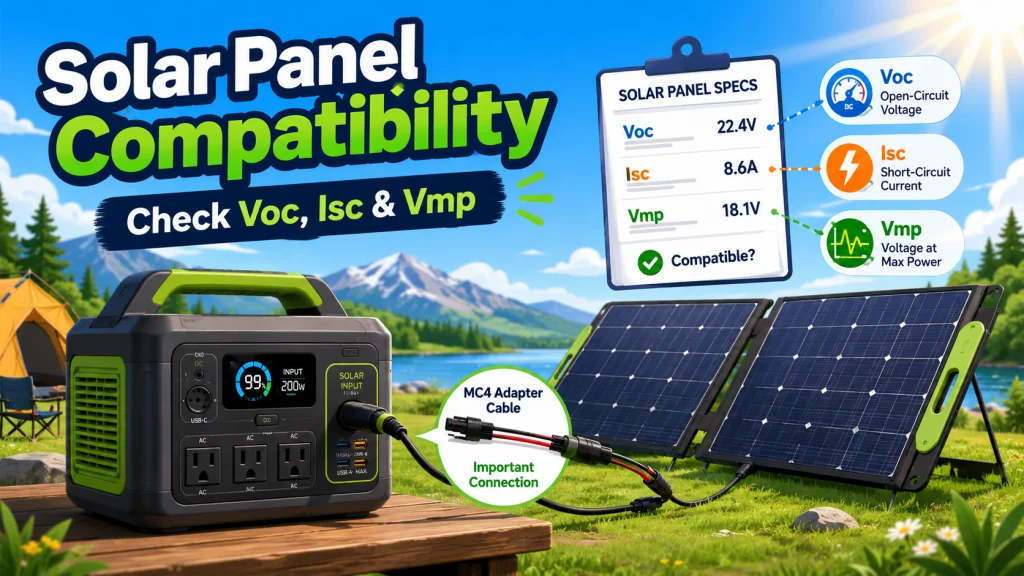
The most common question I fielded at the shop was some version of this: “Do I need the panel that came in the kit, or can I use a different one?” The answer was the same every time. Using third-party solar panels for a solar generator is not a compatibility gamble. It is a spec check. Three electrical numbers on the panel’s label either fall within your unit’s input limits or they do not, and once you know all three pass, you are done. The brand name on the panel changes nothing about that outcome.
Manufacturers do a good job of marketing their own panel kits as the safe, guaranteed option. That guarantee is real, but it is just the result of someone already having done the spec check for you. The same check takes about five minutes with the panel’s product page open alongside your unit’s spec sheet. No special knowledge required, no tools. Just matching three numbers. Here is how it works.
Owner discussions and community threads on this topic almost always come back to the same three checkpoints: did the panel voltage exceed the unit’s input limit, did the current come in over spec, and was the right adapter cable ordered alongside the panel. Every time someone reports a third-party panel “not working,” the answer traces back to one of those three things. The brand name on the panel has never been the issue in any case I have seen.
The Three Numbers That Determine Whether a Panel Is Compatible
Every solar panel ships with a spec label, usually a white or silver sticker on the back of the panel, and these numbers are also listed on the product page under “Electrical Specifications.” Your unit’s input limits are in its spec sheet under “Solar Input” or “PV Input.” The check is a direct comparison.
| Spec Number | What It Measures | The Rule | What Happens If It Fails |
|---|---|---|---|
| Open Circuit Voltage (Voc) | Maximum voltage the panel produces with nothing connected | Must be below your unit’s maximum solar input voltage | The solar input protection blocks charging; in some cases risks damaging the charge controller over time |
| Short Circuit Current (Isc) | Maximum current the panel can deliver | Must be below your unit’s maximum solar input current | The unit may current-limit, throttle input, or reject the connection depending on the charge controller design |
| Maximum Power Voltage (Vmp) | The voltage at which the panel operates at peak wattage | Should fall within your unit’s MPPT voltage range | Charging still works, but MPPT efficiency drops |
All three numbers need to pass. The mistake I watched repeat most often at the counter was buyers who checked Voc because it is the most prominent number on the label, confirmed it was under the unit’s voltage limit, and stopped there. Missing the current check has sent more than one owner home with a panel that physically connected and then triggered a protection shutdown the first time the sun came out strong. The unit does not know or care what brand the panel is. The solar input circuit only knows whether the incoming current exceeds the rated limit.
A concrete example: a 200W panel might list Voc at 24.3V, Isc at 9.4A, and Vmp at 20.6V. If your unit accepts up to 60V solar input at a maximum of 15A with an MPPT range of 12V to 50V, all three numbers pass with margin. The panel is compatible. If that same unit had a narrower Voc ceiling of 22V, the 24.3V panel would fail the voltage check, and connecting it could trigger input protection on the first clear afternoon. The spec check resolves this in advance. Skipping it makes the troubleshooting process considerably less enjoyable.
The Vmp number is worth a separate comment. Voc and Isc are hard limits. Vmp is more of an efficiency consideration. If the panel’s Vmp falls outside the MPPT controller’s optimal window, the unit will still charge, but the controller will not track the panel’s maximum power point as efficiently. For a single-panel setup, the efficiency gap is usually small. For a setup where you are connecting two or more panels, it is worth pulling up the MPPT voltage range in the spec sheet and confirming Vmp lands cleanly within it rather than at the edges.

Featuring 16BB N-Type cells at 25% efficiency, this panel outperforms standard 200W panels and folds down to backpack size at just 13.89 lbs, with a magnetic closure for tool-free setup. Three built-in ports including USB-C PD 45W, and two USB-A ports charge devices directly, while MC4 output connects to most power stations and 12V battery systems. Four adjustable kickstands offer 40, 50, and 60 degree angles, and IP65 rating plus UL 61730 certification ensure durability and safety backed by a 2-year warranty.
Check On AmazonIf you click this link and buy, we earn a commission at no additional cost to you.
The Adapter Cable: The Step the Product Listing Leaves Out
Third-party panels almost universally output through MC4 connectors, the industry-standard locking connectors used on the vast majority of solar panels worldwide. Solar generators almost universally have a proprietary input port: an XT60i port, an 8mm barrel connector, an Anderson Powerpole connector, or a manufacturer-specific format. Getting the panel’s MC4 output connected to the unit’s proprietary port requires an adapter cable. This step is not mentioned on most panel listings, and it catches buyers off guard more than almost any other part of the setup process.
Field Note: The scenario I watched play out more times than I can count: a buyer picks up a third-party panel, goes home, connects the MC4 cables to their unit, and realizes immediately that nothing fits. They come back convinced the panel is defective or incompatible. In almost every case, the panel was fine. The MC4 connectors had nowhere to plug in because nobody told them their unit’s input port was a different format entirely. A $15 adapter cable resolved it. The frustration was entirely avoidable.
The fix is straightforward: before ordering a panel, identify the exact input port format on your unit. The spec sheet names it, and it is usually labeled directly on the unit’s face. Once you know the port type, search for “MC4 to [your port type] adapter cable” and order it alongside the panel. Arriving with both in hand means setup happens the day the shipment arrives, not the day after the replacement cable does.
One caution on adapter cables from unverified sources: some third-party MC4 adapter cables are wired with reversed polarity, positive and negative swapped at the output connector. Connecting a reversed-polarity cable to a live unit typically produces either a 0W input reading or an error code. The panel is fine, the unit is fine, the cable is wrong. The simplest check before first use is a multimeter: measure across the cable’s output connector with the MC4 end in sunlight. If the reading is positive on the positive lead, polarity is correct. If the reading is negative, return the cable. For a full breakdown of the connector formats you are likely to encounter, the solar generator panel setup guide covers all of them, including how to identify what you have and what adapter each format requires.

This 10-foot, 14AWG copper cable splits from a single MC4 connector into three branch plugs covering DC5521, XT60, and Anderson ports, handling up to 9.4A with minimal power loss. IP68-rated MC4 plugs and UV-resistant PVC insulation ensure reliable long-term outdoor performance. Backed by a 24-month warranty from a U.S.-based company.
Check On AmazonIf you click this link and buy, we earn a commission at no additional cost to you.
What to Avoid When Buying Third-Party Panels
Most panels from established third-party manufacturers work exactly as advertised. The compatibility check above handles the electrical side. The issues I have seen with third-party panel purchases almost always trace back to a small, avoidable category of listings rather than anything inherent to buying outside the brand ecosystem.
- Panels with no published specifications. If a listing shows wattage and physical dimensions but no Voc, no Isc, and no Vmp, you cannot run the compatibility check. There is no workaround for this. Reputable manufacturers publish complete electrical specs. If they are absent, skip the listing entirely.
- Panels with proprietary output connectors designed for one brand. Some panel kits on the market use a proprietary output connector that only fits one manufacturer’s input port natively. They are convenient if you have that unit and plan to stay in that ecosystem. They become a problem if you ever change units, because the connector does not adapt to anything else. Standard MC4 output connectors on a panel mean you can adapt to any unit with the right cable.
- Panels claiming wattage that is implausible for their physical size. The relationship between panel surface area and power output is determined by physics, not marketing. A foldable panel claiming 200W at a size significantly smaller than a known 200W panel from an established manufacturer is not delivering 200W under real conditions. If the wattage claim looks too high for the form factor, trust the physics.
- Adapter cables from unverified sources with no polarity documentation. This is separate from the panel itself. A panel can be fully compatible and still produce a 0W reading if the connecting cable is wired incorrectly. Buy adapter cables from sources that clearly state polarity, or verify with a multimeter before first use.
None of this is a case against third-party panels as a category. Established panel manufacturers publish full electrical specs, use standard MC4 output connectors, and sell panels that work exactly as rated once the spec check passes. The difference between a reputable third-party panel and an unbranded one is mostly this: the reputable listing shows you Voc, Isc, and Vmp upfront so you can verify before ordering. The unbranded listing leaves those numbers out, which means you cannot check and should not buy.
It is worth knowing what a good listing looks like versus a bad one. A good third-party panel listing includes: the wattage, Voc, Isc, Vmp, physical dimensions, connector type (MC4 standard), and a weight that makes sense for the rated output. A bad listing shows wattage and a product photo, nothing else. If you cannot find Voc and Isc on the product page, that is the complete answer to whether you should buy that panel.

This 1,999-count multimeter measures AC/DC voltage, DC current, resistance, and diode, with a 2-per-second sampling rate and backlit LCD for use in low-light conditions. Double-fuse overload protection and a silicone outer cover guard against electrical damage and drops. Data hold, auto shutoff, and a continuity buzzer round out a practical feature set for household, automotive, and industrial troubleshooting.
Check On AmazonIf you click this link and buy, we earn a commission at no additional cost to you.
Why Brand Ecosystems Usually Come Down to One Extra Cable
Solar generator manufacturers have a clear incentive to keep panel purchases within their own product line, and the way they pursue it is not by making third-party panels technically incompatible with solar generators. They pursue it by making the adapter step slightly inconvenient. Some manufacturers have moved to proprietary input port formats that require a specific adapter cable. Others have designed their own panels with matching output connectors that plug directly into the unit without any intermediate step. The implicit message is: buy our panel and it just works.
In practice, this adds one cable purchase to a third-party panel setup. That cable typically costs $15 to $25 and arrives in two days. For most buyers, the price difference between a brand-name panel kit and an equivalent third-party panel with an adapter cable is large enough to justify a second panel rather than one premium one. More total panel wattage, done correctly, almost always does more for real-world charging speed than a single higher-priced panel with a logo on it.
Where the brand-specific ecosystem is genuinely worth considering is real-time panel monitoring. Some manufacturers’ own panels report live wattage data back to the unit’s app via a direct connection. Third-party panels connected through an adapter typically do not. If seeing panel-level wattage in the app matters to your setup, it is a factor worth acknowledging. If you simply want to charge the unit at the highest available wattage, the panel’s electrical specs are the only variable that matters, and any compatible panel with the right adapter will do it. For owners newer to how all of these decisions fit together, the complete guide to operating a solar generator covers the full ownership workflow from first charge through ongoing setup in one place.
Before You Buy: A 60-Second Compatibility Checklist
Every point in this article comes back to a short set of questions you can answer from a product listing before placing an order. If any of these cannot be answered from the listing, that alone tells you something useful.
- Does the listing publish Voc, Isc, and Vmp? If not, stop here. You cannot run the check without these numbers.
- Is the panel’s Voc below your unit’s maximum solar input voltage? Pull the number from your unit’s spec sheet. Compare directly. Hard limit, no exceptions.
- Is the panel’s Isc below your unit’s maximum solar input current? Same process. Also a hard limit.
- Does the panel’s Vmp fall within your unit’s MPPT voltage range? A soft check for efficiency. Not a safety issue, but worth confirming for larger setups.
- Does the panel output through standard MC4 connectors? If yes, you can adapt it to any unit. If no, verify the connector is compatible with your specific unit before ordering.
- Have you ordered the correct MC4 adapter cable at the same time? Confirm your unit’s input port type and order the matching cable alongside the panel. This is the step most buyers regret skipping.
All six answers come from the product listing and your unit’s spec sheet. If a listing cannot give you answers to the first four, do not buy it regardless of price. If all six check out, the panel should work with that unit under normal conditions.
Final Thoughts: What the Right Panel Decision Actually Looks Like
The buyers who end up satisfied with a third-party panel are the ones who treated the purchase like a spec match rather than a brand decision. They pulled up Voc, Isc, and Vmp, confirmed all three against the unit’s input limits, ordered the right adapter cable at the same time, and verified polarity before first use. That process takes about 10 minutes total. The outcome is a panel that charges the unit identically to the brand kit, usually for significantly less money.
The buyers who end up frustrated are the ones who bought on price alone, skipped the spec check, and discovered the Voc exceeded the unit’s limit on the first sunny day, or the adapter cable arrived a week after the panel. Neither situation is the panel’s fault. Both are the result of a skippable step that got skipped. The good news is that the checklist above makes skipping it harder to do accidentally. Use it, and the third-party panel purchase becomes one of the easier decisions in the whole solar generator setup process.

This inline power analyzer measures voltage, current, power, capacity, and elapsed time across solar, wind, EV, and battery systems from 4.8 to 60V. Key specs include 0 to 200A at 0.01A accuracy, 0 to 100V at 0.01V resolution, and 0 to 6,554W at 0.01W resolution, with an optional auxiliary battery extending range to 100V. An ultra-bright backlit display ensures clear readings in any lighting condition.
Check On AmazonIf you click this link and buy, we earn a commission at no additional cost to you.
FAQs
🔌 Can I use any solar panel with my solar generator?
Yes, as long as three spec numbers pass: Voc must be below your unit’s maximum solar input voltage, Isc must be below your unit’s maximum solar input current, and Vmp should fall within the MPPT voltage range. You will also need an MC4 adapter cable that matches your unit’s input port format in most cases.
⚡ What is the difference between Voc and Vmp on a solar panel?
Voc is the open circuit voltage, what the panel produces at its absolute maximum with nothing drawing current. Vmp is the voltage at which the panel operates when delivering peak wattage under load. Voc is the safety check against your unit’s maximum input limit. Vmp determines how efficiently the MPPT controller tracks peak power from that panel.
🔧 Do I need an adapter cable to connect a third-party panel to my solar generator?
Almost always, yes. Third-party panels output through standard MC4 connectors. Most solar generators have a proprietary input port. You will need an MC4-to-[your unit’s port type] adapter cable. Find the port type in your unit’s spec sheet, then order the matching adapter alongside the panel so both arrive together.
🌞 Will a third-party panel charge my unit as fast as the brand’s own panel?
Yes, if the wattage and voltage specs are equivalent. Charging speed is a function of wattage output and MPPT efficiency, not brand name. A third-party panel with a Vmp that falls cleanly within the unit’s MPPT range will charge at the same rate as a branded panel with matching specs.
📋 Where do I find the solar input specs for my solar generator?
In your unit’s spec sheet, either in the included manual or downloadable from the manufacturer’s website. Look for “Solar Input,” “PV Input,” or “Charging Specifications.” It will list the maximum input voltage, maximum input current, and often the MPPT voltage range. These are the three numbers you compare against the panel’s Voc, Isc, and Vmp.
🚫 Why is my third-party panel showing 0 watts of solar input?
The most common causes: a loose or unseated MC4 or adapter connection, a panel Voc that exceeds the unit’s input voltage limit triggering input protection, a reversed-polarity adapter cable, or the unit’s solar input port not being activated. Check the connection, verify the Voc is within spec, and confirm the input port is switched on before assuming the panel is faulty.