Four Reasons a Solar Generator Won’t Turn On
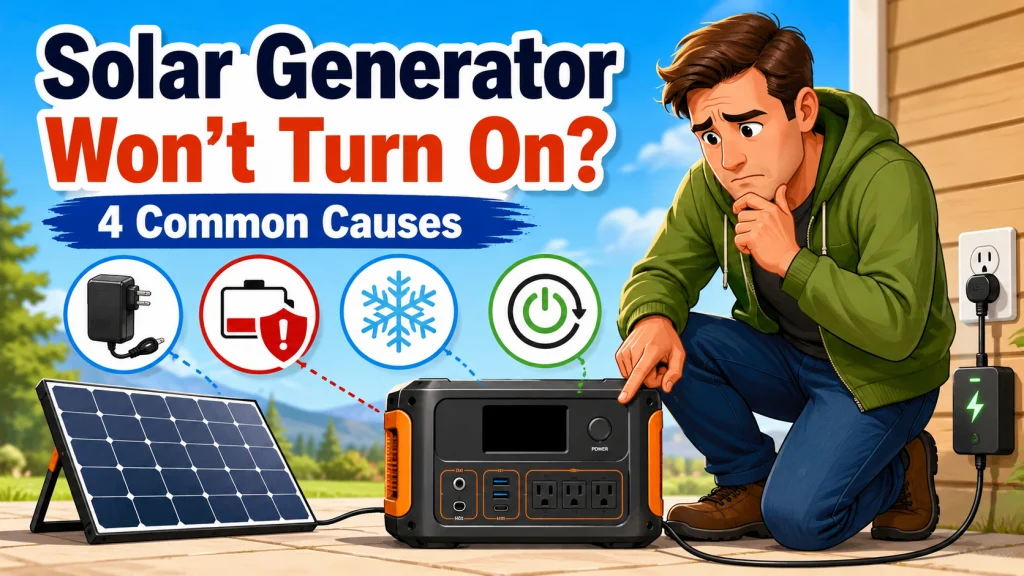
When your solar generator won’t turn on, the instinct is to assume something failed inside the unit. That assumption is almost always wrong. In my years selling and servicing these units at the counter, the overwhelming majority of “dead” power stations that came back in were completely fixable. A solar generator that will not turn on and shows a blank display usually comes down to four specific causes. This article covers that exact scenario: no display, no response from the power button, nothing. If your unit does start up but then shows an alarm or error code, that is a different diagnostic path. The full solar generator troubleshooting guide, organized by symptom, covers those scenarios separately.
Work through the four causes below in order. They are ranked by how frequently I have seen each one. The first cause alone accounts for most of the non-responsive units I have encountered. Do not skip ahead based on assumptions about what might have happened.
| Situation When the Problem Started | Most Likely Cause | Time to Resolve |
|---|---|---|
| Stored unused for weeks or months, now blank | Deep discharge BMS protection | 30 to 60 minutes of AC wall charging |
| Recently stored in a cold garage, vehicle, or shed | Low-temperature BMS lockout | 1 to 2 hours inside at room temperature |
| Unresponsive after firmware update or after a full discharge | Firmware lockout requiring hard reset | 10 to 15 minutes |
| Was last used connected to wall power, now disconnected | UPS or pass-through mode standby | 2 to 5 minutes to reconnect and check settings |
Each cause has a specific fix. If the first fix does not resolve the problem, move directly to the next. The process is straightforward once you know what you are looking for.
Cause 1: The Battery Has Drained Into Protection Mode
LiFePO4 batteries have a battery management system that cuts power to everything, including the power button circuit, when the battery voltage drops to a critically low level. The unit is not broken. The BMS has intentionally disconnected the output to protect the cells from a deep discharge that would cause permanent damage. A solar generator that has gone dead after sitting unused for an extended period is almost always in this exact state. The display is blank, pressing the power button produces nothing, and even connecting a charger may show no immediate visible reaction. All of that is the protection system working correctly, not a sign of failure.
The fix is to connect the unit to an AC wall charger and leave it plugged in for 30 to 60 minutes before pressing the power button again. Do not press the button repeatedly during that window. The charger needs time to bring the battery out of the deep discharge protection threshold before the power button circuit becomes active. After 30 to 60 minutes, try the power button. On some units, if the display activates briefly and the unit immediately shuts off again, hold the power button for 10 seconds to complete a reset sequence after deep discharge recovery. The specific sequence varies by model, so check the manual if a single hold does not keep the unit on.
Field Note: The most common “dead unit” scenario I dealt with at the shop was owners who ran their solar generator through one outage, put it away in a closet or cabinet at a low state of charge, and did not reconnect it for three to five months. LiFePO4 self-discharge is slow at 1 to 3 percent per month, but many units also carry small standby drains from monitoring circuits, app connectivity, and internal electronics. A unit stored at 20 to 30 percent for several months can fall into BMS protection faster than the battery chemistry alone would suggest. The owner pulls it out before the next storm, gets a completely blank display, and assumes the battery is finished. Thirty minutes on the wall charger resolved almost all of them. The habit that prevents this entirely: charge to 50 to 80 percent before storage, and reconnect for a top-up every three months if the unit is sitting unused.
Building that storage habit from the start is part of getting the full service life out of a LiFePO4 unit. The complete guide to using and maintaining a solar generator correctly covers charging practices, storage intervals, and the other ownership habits that keep a unit functional over the long term.

This plug-in watt meter tracks true RMS voltage, current, wattage, apparent power, frequency, power factor, kWh, electricity cost, and peak min and max power across 5 dedicated buttons for instant one-click access to each parameter. It automatically calculates your electricity bill for any appliance drawing over 2 watts, covering TVs, refrigerators, computers, washing machines, and more. Three alarm modes trigger visual and LED alerts when load power, kWh consumption, or estimated cost exceeds your set thresholds, with an adjustable overload limit up to 3,680W. A built-in chip retains all data through power failures, and the wide-angle LCD display stays readable from any position without bending or repositioning.
Check On AmazonIf you click this link and buy, we earn a commission at no additional cost to you.
Cause 2: Cold Temperature Has Locked the BMS
Below approximately 32 degrees Fahrenheit, LiFePO4 batteries cannot safely accept a charge. Charging cold lithium cells causes a process called lithium plating on the anode, a form of internal structural damage that the BMS prevents by refusing to operate normally at low temperatures. Most units will not charge, and some will not power on at all, until the internal battery temperature rises to a safe operating range. If the unit was stored in a cold garage, a vehicle trunk, a shed, or anywhere unheated during cold weather, low-temperature lockout is the most likely cause of a solar generator not powering on with an otherwise normal battery level.
The fix is simple. Bring the unit inside to a room-temperature environment and leave it for one to two hours. Do not try the power button during that window. Once the battery has warmed closer to room temperature, try the power button again. Many units begin responding normally after one to two hours indoors. This is not permanent damage. It is not a hardware fault, and it does not require repair. It is the BMS functioning exactly as it was designed to, and the condition fully reverses once the battery warms up.
One detail worth knowing: a battery that was stored cold and recently warmed will often show a higher state of charge on the display than it can immediately deliver. A unit showing 75 percent after coming in from a 30-degree garage may behave more like 60 to 65 percent for the first 30 to 45 minutes of use. This is a normal characteristic of LiFePO4 at low temperatures and resolves on its own as the cells warm under load. It is not a sign of capacity loss.
Cause 3: A Firmware Lockout Requires a Hard Reset
On some modern solar generators, embedded firmware can leave the unit completely unresponsive after an incomplete update or after certain full-discharge recovery situations. When this happens the unit may appear completely dead. The display is blank, the power button does not respond, and connecting a charger shows no activity. This is a software lockout, not a hardware failure. A hard reset clears it in most cases.
The hard reset procedure is to hold the power button for 10 to 15 seconds. On some units the display will flash briefly and then go dark again. If that happens, release the button and immediately repeat the hold. On other units the unit restarts normally on the first attempt. If a 10 to 15 second hold produces no reaction at all, check the manufacturer’s documentation or support site for your specific model’s reset sequence. Some units have a dedicated reset button, separate from the power button and recessed into the housing, that requires a paperclip or similar tool to press. The user manual should show its location.
If a firmware update was the suspected trigger, do not attempt another update until the unit is fully operational and charged above 50 percent. Run any future firmware updates with the unit connected to AC wall power, not solar only. Attempting an update on a partially depleted unit, or on a unit running from solar power alone, increases the risk of another incomplete update and another lockout. The AC wall connection keeps the charging current stable throughout the update process.

Built with IBC cells at 25% conversion efficiency, this bifacial panel absorbs sunlight from both sides and bends up to 221 degrees to conform to curved surfaces like car roofs and balconies. At just 4.52 lbs it is 56% lighter than rigid panels, and IP68 waterproofing plus IEC TS 63163 certification across 19 international tests ensure reliable output from -40 to 85 degrees Celsius. A 3-meter flat cable enables flexible installation in under 5 minutes.
Check On AmazonIf you click this link and buy, we earn a commission at no additional cost to you.
Cause 4: UPS or Pass-Through Mode Standby Behavior
Some solar generators include a UPS or pass-through mode, where the unit stays permanently connected to wall power and switches to battery instantly if the grid goes down. The display and power button behavior in this mode is different from normal portable operation. When wall power is removed from a unit in UPS mode, some units will appear to turn off entirely. The display goes dark, and the power button produces no visible response, even though the battery and internal systems are fully functional. To an owner who is not aware of the mode, this looks identical to a completely dead unit.
The check takes about two minutes. Reconnect the unit to a wall outlet. If the display activates immediately and everything responds normally, the unit is fine. It was in UPS standby, not dead. To return to normal portable operation, navigate to the unit’s settings menu and disable UPS or pass-through mode, then disconnect from wall power and verify the unit operates on battery alone. If the unit was set up in a shared location, or if someone else in the household may have changed settings, this is worth eliminating before assuming anything more serious is wrong.
What Not to Do While the Unit Is Unresponsive
Most of the instinctive responses to a blank display are either unhelpful or actively risky. The four causes above all have calm, low-effort fixes. The responses below either void the warranty, create a safety risk, or simply do not work and waste time.
- Do not open the unit to inspect the battery or BMS. Disassembling the housing voids the warranty immediately and exposes live battery connections that can arc or short. There is no owner-serviceable component inside that relates to any of the four causes covered in this article.
- Do not use a different charger to “force” a recovery. Plugging in a charger with a higher voltage or wattage than the unit’s rated input can damage the BMS or battery cells. Use the unit’s included AC adapter or a charger rated to the unit’s exact input spec.
- Do not use a heat gun, space heater, or hair dryer on a cold unit. Direct applied heat to the battery housing causes uneven temperature distribution inside the cells. Bringing the unit indoors and waiting is the correct approach. Forced external heat is not.
- Do not repeatedly press the power button during a deep discharge recovery. The power button circuit is inactive while the BMS is in protection mode. Pressing it repeatedly does nothing except delay you from noticing when the unit does come back online. Connect the charger, wait the full 30 to 60 minutes, and then try once.
- Do not attempt to charge a unit with visible moisture, a wet port, or a burned smell. If there is any sign of water ingress at the charging ports or an unusual smell after a previous use, do not reconnect to power. Contact warranty support and describe the condition before doing anything else.
These are not edge cases. From what I have seen, at least two of these show up in owner forums every time someone posts about a unit that will not turn on. None of them moves the diagnosis forward. Working through the four causes above in order is the faster and safer path.

With an inner dimension of 13.5 by 10.5 by 12 inches, this carrying bag fits popular power stations including Jackery Explorer 1000, 1000 V2, 500, and 300, as well as EcoFlow River and River 2 Pro and Max models. The tear-resistant, water-resistant exterior with padded lining and two-way zippers protects against moisture, dust, and scratches during outdoor use. A removable main divider lets you customize the layout, while a lid zipper pocket and front pouch keep cables, adapters, and chargers organized. Adjustable shoulder straps and a padded top handle offer flexible carry options for camping, travel, and other outdoor activities.
Check On AmazonIf you click this link and buy, we earn a commission at no additional cost to you.
Final: When to Contact Warranty Support
If you have worked through all four causes and the unit still will not turn on, you have done what can reasonably be done at the owner level. To confirm: you have connected to AC wall power at room temperature for at least 30 to 60 minutes, you have ruled out cold temperature storage as a factor, you have held the power button for 10 to 15 seconds to attempt a hard reset, and you have checked whether the unit was in UPS or pass-through mode. If none of those steps produced any response, the problem is most likely inside the unit at a level that is not owner-fixable. The most probable candidates are a failed BMS, a damaged main board, or a cell-level failure inside the battery pack. None of these can be safely diagnosed or repaired without disassembling the unit, which voids the warranty.
Before you contact support, have the following ready to speed up the conversation:
- The unit’s model number, found on the label on the back or bottom panel
- The purchase date and retailer
- A clear description of what you tried and in what order, including how long you charged it, whether the environment was room temperature, how many hard reset attempts you made, and whether you checked for UPS mode
- The approximate battery level before the problem started, if you know it
Walking support through the steps you already took moves the conversation past the basic script and toward an escalation or replacement. A unit that passes all four checks and still produces no response is almost certainly a warranty case rather than user error, and a quality manufacturer should evaluate it under warranty if the unit is still within coverage. Document what you did and present it clearly.
If the unit is out of warranty and the diagnosis points to a BMS or main board failure, it is worth comparing the cost of a manufacturer repair against the cost of a replacement unit. In my experience, when a portable power station reaches that point outside of warranty, repair estimates often approach or exceed half the cost of a new unit. When you are eventually looking at replacing, focus on models with a published reset procedure, clear storage behavior in the documentation, low-temperature protection specs, a stable firmware update record, and a support team that is known to respond. These are not things marketers highlight, but they are the factors that determine whether the next unit is easy to own over the long term.

This 1kWh LFP battery station charges from 0 to 80% in just 50 minutes via AC input, and its LiFePO4 chemistry delivers a 3,000 plus cycle lifespan that is roughly 6 times longer than standard lithium batteries. Capacity is expandable up to 3kWh with additional batteries, making it well suited for camping, RVs, or off-grid living. Its 1,800W output powers across 15 outlets, handling around 90% of household appliances, and accepts up to 500W of solar input for clean, fuel-free charging. The package includes a 5-year customer service guarantee.
Check On AmazonIf you click this link and buy, we earn a commission at no additional cost to you.
FAQs
🔋 Why won’t my solar generator turn on after sitting in storage for a few months?
LiFePO4 batteries self-discharge at 1 to 3 percent per month. If the unit was stored at a low charge level, the BMS may have entered deep discharge protection and cut power to everything, including the power button. Connect to an AC wall charger and leave it for 30 to 60 minutes before trying the power button again. Most units recover fully with no additional steps.
❄️ Can cold weather stop a solar generator from turning on entirely?
Yes. Below approximately 32 degrees Fahrenheit, the BMS on most LiFePO4 units prevents normal operation to protect the battery from cold-temperature charging damage. Bring the unit inside to room temperature and wait one to two hours before trying the power button. This is not permanent damage. The unit will operate normally once the battery warms up.
🔄 How do I perform a hard reset on a solar generator that won’t respond?
Hold the power button for 10 to 15 seconds. If the display flashes briefly and goes dark again, release and immediately repeat the hold. Some units have a separate recessed reset button requiring a paperclip. Check the user manual for your specific model’s sequence, as the steps vary between manufacturers.
💡 Why does my solar generator look completely off even though the battery should have charge?
This is often UPS or pass-through mode standby behavior. When some units are disconnected from wall power after operating in UPS mode, the display goes dark and the unit appears off even though the battery is fine. Reconnect to wall power briefly. If the display activates immediately, the unit is functional and just needs UPS mode disabled in settings.
⚡ Does fully draining a solar generator damage the battery permanently?
A single deep discharge is unlikely to cause permanent damage if the BMS triggers protection before the cells reach a dangerous voltage. Repeated deep discharges over time do accelerate capacity loss, however. For regular use, try to recharge before the unit drops below 20 to 25 percent to preserve battery health across its full cycle life.
🛠️ How long should I charge a dead solar generator before expecting it to respond?
Give it at least 30 to 60 minutes of AC wall charging before pressing the power button. Some units in deep discharge protection show no charging activity on the display for the first 10 to 15 minutes. This is normal while the BMS verifies the incoming voltage. Do not press the power button during this window. If there is still no response after 60 minutes, move on to checking the other causes.